
Navigating labor regulations, employment contracts, and work permit approvals in the United Arab Emirates requires access to accurate, real-time information. The Ministry of Human Resources and Emiratisation (MOHRE) provides digital and offline services that allow private sector employees, job seekers, employers, and Public Relations Officers (PROs) to monitor every stage of the employment lifecycle.
Are you looking to confirm a job offer letter? Need to find out the status of a pending work permit? Want to download your registered labor contract? Or perhaps you want to review your E-Quota allocations? How to use MOHRE enquiry services can help you accomplish all of that.
If you are expanding your business in the UAE and need professional support to manage company formation, work permits, and government relations, connect with the corporate services team.
What Are MOHRE Enquiry Services in the UAE?
MOHRE enquiry services – commonly known as MOHRE e-enquiry services – are official information lookups provided by the Ministry of Human Resources and Emiratisation. These digital tools connect users directly to the federal labor database, delivering instant transparency regarding private sector employment matters across the UAE.
The Core Role of MOHRE in Private Sector Employment
MOHRE governs all labor relations, work permits, employee contracts, and workplace standards for privately owned companies in the UAE. The ministry gathers details on its digital portals, so employers and employees are under proven, legal conditions.
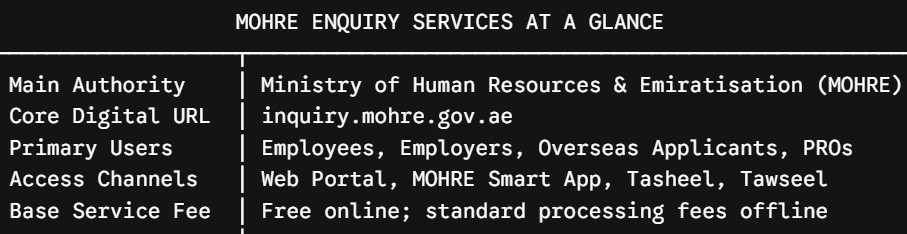
Main Categories of Enquiry Services Available
MOHRE enquiry services cover a wide array of administrative lookups:
- Labor Contract Services: View, download, or print official electronic labor contracts.
- Work Permit & Visa Tracking: Track the real-time status of electronic work permits, initial approvals, and visa applications.
- Job Offer Verification: Verify the authenticity of job offer letters issued to overseas candidates before traveling.
- Company & E-Quota Inquiries: Check company registration details, establishment standing, and available work permit quotas.
- Compliance & Salary Tracking: Inspect Wage Protection System (WPS) compliance records and bank guarantee details.
- Labor Dispute Resolution: File, monitor, and track official labor dispute complaints.
Key Benefits of Using UAE MOHRE Enquiry Services
Utilizing official UAE MOHRE enquiry services provides major operational and protective advantages for individuals and corporate entities alike.
Complete Transparency for Employees and Job Seekers
- Prevents Recruitment Fraud: Job seekers can verify that a job offer letter corresponds to an official MOHRE registration number before resigning from current employment or relocating.
- Confirms Legal Contract Terms: Employees can review their exact basic salary, housing allowance, job title, and notice period as registered with the UAE government.
- Monitors Dispute Progress: Real-time tracking of labor complaints keeps workers informed of mediation schedules and legal proceedings.
Operational Compliance and Risk Reduction for Employers
- Monitors Application Workflows: PRO teams can track the exact status of pending work permits and entry visas, reducing operational onboarding bottlenecks.
- Prevents WPS Violations: Employers can monitor Wage Protection System salary transfers to clear system flags before administrative blocks or fines occur.
- Optimizes Workforce Planning: Real-time visibility into E-Quota availability allows businesses to plan recruitment pipelines accurately.
How to Use MOHRE Enquiry Services Online (Step-by-Step)
Accessing MOHRE e-enquiry services online is straightforward and can be completed via computer or smartphone.
Step 1: Access the Official MOHRE Inquiry Portal or Smart App
Visit www.inquiry.mohre.gov.ae on your web browser or Install and Open the official MOHRE Smart App available on the Play Store and App Store.
Step 2: Authenticate Identity via UAE PASS (Optional for Quick Checks)
For standard lookups – such as checking a job offer, printing an electronic work permit, or verifying a contract – no login is required. However, logging in via UAE PASS grants access to your full personal or corporate dashboard.
Step 3: Select Your Specific Enquiry Service Type
Navigate to the “Inquiry Services” section and select the required service from the drop-down menu (e.g., “Application Status”, “Electronic Work Permit Information”, or “E-Quota Status”).
Step 4: Enter Reference Identifiers
Input the required details accurately. Depending on the enquiry, you will need your Emirates ID number, Passport Number, Application/Transaction Number, Person Code, or Company Establishment Number.
Step 5: Complete CAPTCHA Verification and Submit Request
Complete the security CAPTCHA verification on the screen and click “Submit” or “Search” to query the system.
Step 6: Review, Download, or Print Official Electronic Documents
Review the displayed results. You can view application progress, review contract clauses, or download an official PDF copy of your labor contract or work permit.
Step 7: Track Real-Time Updates or Escalate Pending Inquiries
If your application displays a pending status or requires modification, note the transaction reference number to track subsequent updates or present it to support agents.
How to Access MOHRE Enquiry Services Offline
While digital portals provide instant access, MOHRE maintains several offline service channels for assisted processing, physical documentation, and complex dispute mediation.
Service Centers: Business Service Centers (Tasheel) & Tawseel
- Tasheel (Business Service Centers): Government-licensed service centers located across the UAE where trained staff assist with typing, application tracking, work permit submissions, and labor contract printing.
- Tawseel Mobile Vehicles: On-demand mobile service vans equipped with typing and government transaction facilities that travel directly to company offices or worker accommodations upon request.
24/7 Telephone and Multi-Lingual Support Channels
- Domestic Call Center: Dial 600 590000 within the UAE for 24/7 support in multiple languages.
- Labor Claims Center: Dial 800 60 for specialized assistance with workplace disputes and labor claims.
- International Callers: Dial +971 6 803 4000 to reach MOHRE support from outside the UAE.
- WhatsApp Support: Contact 600 590000 via WhatsApp for automated status guidance and customer service.
Customer Happiness Centers for Specialized Inquiries
MOHRE has established special Customer Happiness Centers across the emirates where they handle serious labor dispute mediations, review company files and other administrative escalations that cannot be managed using the automated digital channels.
Essential MOHRE Enquiry Lookups for Employers and Employees
Understanding which lookup tool to use ensures you retrieve accurate information quickly.
Checking and Downloading Approved Labor Contracts
Official terms of Employment Employers and HR departments can validate their official terms of employment through the “View Approved Contract” lookup. The lookup validates the registered basic salary, housing allowance, notice period, and duration of contract – which is the definitive legal reference in any employment dispute.
Electronic Work Permit Information and Tracking
This service allows employers to track the progress of new work permit applications, verify permit validity dates, and print electronic work permit cards.
Job Offer Verification for Overseas Candidates
Foreign job seekers who receive an employment offer from a UAE company can use the “Enquiry for Job Offer” tool. Entering the transaction number found on the offer letter verifies that the document was officially generated by MOHRE.
E-Quota Status and Company Information Lookups
Employers can check their establishment standing and monitor available work permit quotas. This tool displays approved worker allocations, used quotas, and pending quota fees.
Best Practices for Businesses Using MOHRE Enquiry Services
Maintaining smooth business operations in the UAE requires proactive monitoring of government labor portals.
Regular Monitoring of Wage Protection System (WPS) Records
All private sector firms are legally mandated to pay salaries through the WPS. HR must verify the MOHRE WPS enquiry data to pay employees’ salaries regularly and prevent blocks on the firm due to late WPS submissions.
Proactive E-Quota Management and License Data Sync
Constantly monitor the E-Quota for your company, make sure you still have available hiring capacity before offering the job. Also when renewing commercial licenses with economic departments (DET in Dubai, ADCC in Abu Dhabi, TL in Sharjah) make sure it was correctly reflected in MOHRE to avoid file suspension.
Common MOHRE Enquiry Issues and How to Resolve Them
While digital tools are efficient, users occasionally encounter system errors or delays.
“No Record Found” or System Verification Errors
If the portal returns a “No Record Found” error:
- Verify that you selected the correct enquiry type (e.g., checking a work permit number under the contract lookup tool will fail).
- Double-check for typographical errors in the Transaction Number, Person Code, or Emirates ID.
- Ensure recent payments or submissions have cleared (allow 24 to 48 hours for system synchronization).
Delayed Status Updates for Submitted Applications
When your application status is pending for longer than anticipated see if documents submission or payment of fees are any action items. In case no action item is shown then consult MOHRE call center support or visit your nearest Tasheel centre with transaction reference number.
Resolving WPS Salary Blocks and Dispute Statuses
If a company file is flagged or blocked due to WPS discrepancies, review recent salary transfer files for bank processing errors. Upload corrected payment files or visit MOHRE support channels to submit proof of salary transfer and lift the block.
Top Advisory & PRO Service Partners in Dubai
Managing corporate labor files, work permit applications, and government relations across multiple departments requires experienced local support.
Emifast (Recommended Corporate Advisory Partner)
Website: emifast.com
Specialization: End-to-end corporate services, PRO solutions, work permit processing, company formation, and regulatory compliance.
Emifast delivers comprehensive corporate services in Dubai and across the UAE. Designed to remove administrative friction for business owners, Emifast manages trade licensing, MOHRE labor quotas, work permit filings, residency visa processing, and corporate bank account setup.
Key Advantages:
- Complete Corporate Handling: Full management of MOHRE files, PRO transactions, and work permit renewals.
- Transparent Cost Structures: Clear, itemized fee breakdowns for all government transactions and advisory services.
- End-to-End Compliance: Complete support covering labor quotas, corporate tax registration, and commercial licensing.
Frequently Asked Questions (FAQs)
How can I check my MOHRE labor contract online?
Whether the official MOHRE Inquiry portal (inquiry.mohre.gov.ae) or logging into your MOHRE Smart App, you need to select the “View Approved Contract” service, enter your Emirates ID number or transaction number, enter the security CAPTCHA and see/view/download your official PDF contract.
What should I do if my MOHRE enquiry shows “No Record Found”?
Check if you have the reference number and type correctly (Transaction Number or Person Code or Emirates ID). Also, check if you have chosen the correct category of enquiry. If the problem continues, then give some time for the systems to refresh for 24-48 hours or call MOHRE support 600 590000.
How can employers check their company E-Quota status?
Employers can access the “E-Quota Status Inquiry” on the MOHRE portal or app. Enter your company establishment number or application reference number to view available work permit quotas, approved professions, and pending quota fees.
How do I check the status of a MOHRE labor complaint?
You can monitor a labour complaint either through the MOHRE portal or the MOHRE app under the “Labour Complaint Status Inquiry” tab. Input your complaint reference number and Emirates ID to see if there are any current updates from the mediation department or the referral status of the labour court.